Rug Making
How to Make Rugs in Make Rugs: Yarn, Tufting and Finishing
Last updated:
Start with Simple Mat to learn the controls, then try an Inset Heart with separate colors for its outer band and center. Making a finished rug takes yarn assignment, tufting, shaving, and a final choice of whether to add an outer border.
Quick answer
Hold E at the Yarn Dispenser to roll yarn, then collect it from the Collection Tray. Use E at the Tufting Frame, choose a design, and assign all required yarn before continuing. Hold and drag to fill each region with its assigned yarn, then select Finish. Take the Unshaven rug to the Shaving Table, shave it to 100% clipped, and add an outer border or choose None.
View in-game reference
Prepare Yarn and Start a Simple Mat
Simple Mat is a Level 0 design with one area and a one-yarn requirement, making it a straightforward first rug.
- Approach the Yarn Dispenser and hold E on Roll Yarn.
- When yarn is ready, approach the Collection Tray and press E on Collect Yarn. Collecting makes the material available for your rug.
- Go to the Tufting Frame, the wooden frame with a fabric surface, and press E on Make a Rug.
- Select Simple Mat and choose Start Tufting.
- Assign one available yarn to its single area, then choose Continue.
For another shape, check the designs and unlock requirements. Use the yarn color directory to identify materials by name and color.
Assign Every Required Yarn Before Continuing
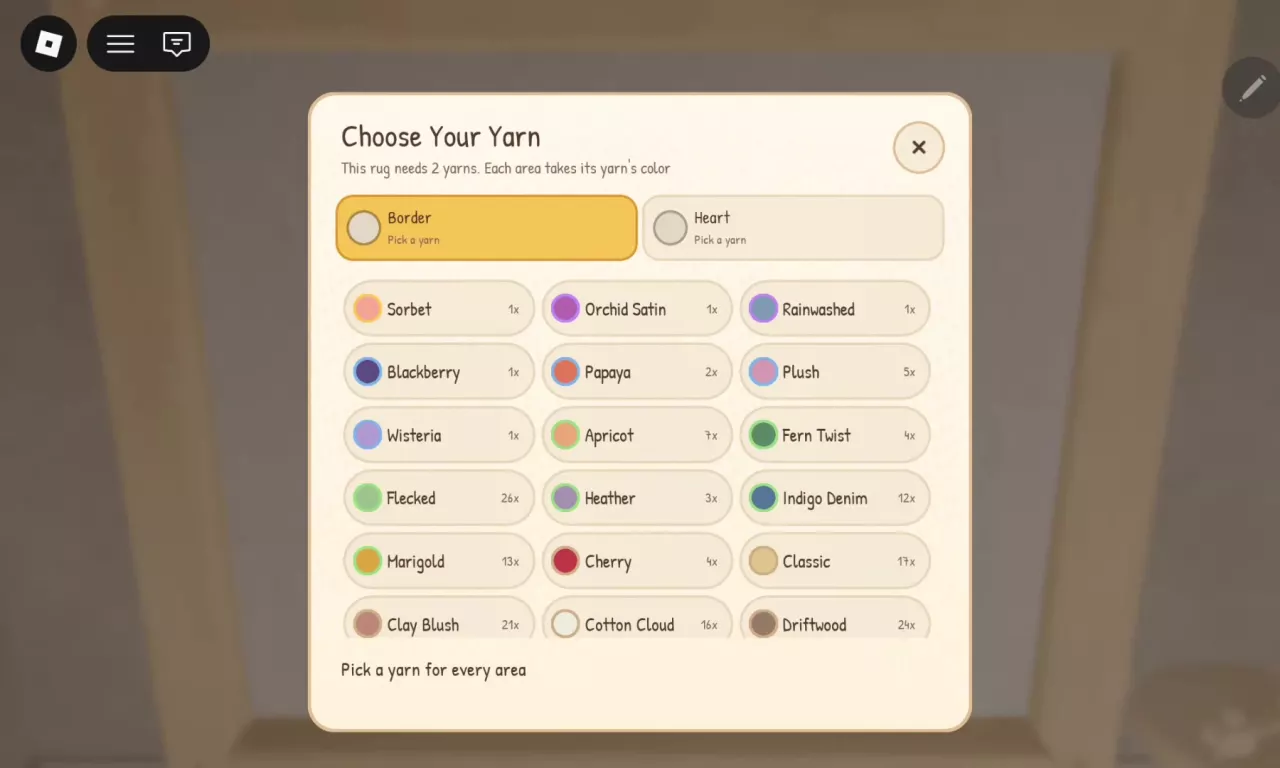
In Choose Your Yarn, select each required assignment and choose its material. The numbers beside yarn names—such as 1x or 2x—show your available inventory, not how much the recipe requires. Assigning a portion reduces the available quantity.
For an Inset Heart:
- If it is locked, hold its unlock control to purchase the design for 40 cash.
- Choose Start Tufting.
- Select Border and assign one yarn portion to the surrounding band.
- Select Heart and assign a second portion to the center.
- Choose Continue after both assignments are filled.
If you have only one portion, leave yarn selection, collect another available yarn from the Collection Tray, and return to complete the assignments. For a white-and-lavender heart, assign Cotton Cloud to Border and Wisteria to Heart.
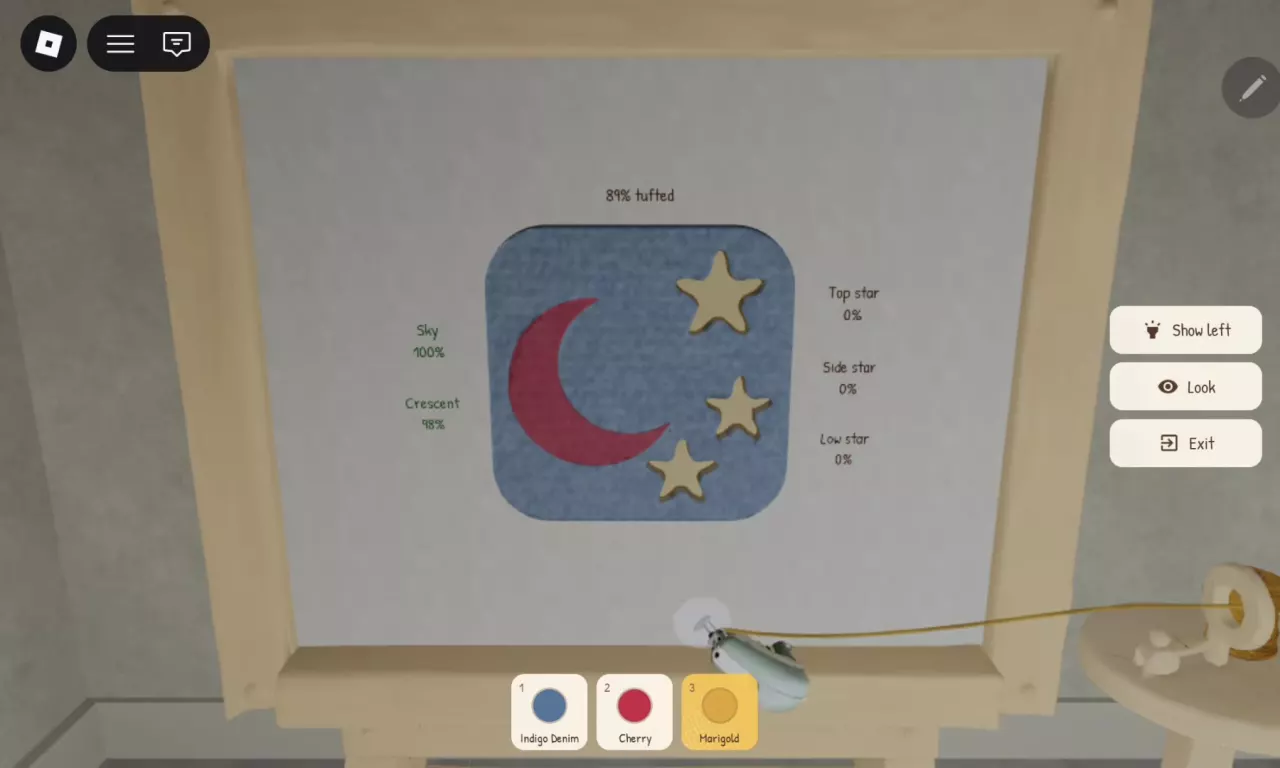
Area count and yarn requirements are different. Moon and Stars has five named areas, but its Indigo Denim, Cherry, and Marigold setup uses three yarn selections. Follow the design's required assignments rather than counting every separate shape as another yarn portion.
Tuft Each Region with Its Assigned Yarn
Hold and drag the tufting tool across the marked fabric to fill it with yarn. Use the yarn options at the bottom to switch materials as you move between regions.
For the Cotton Cloud/Wisteria Inset Heart, work through the outer Border with Cotton Cloud until its progress reaches 100%. Then select Wisteria in the bottom bar and fill Heart. Once the overall and individual region progress are complete, select Finish at the completion prompt. The rug enters your inventory as Unshaven, ready for the shaving stage.
If you see “this area needs sky yarn”
Select Sky in the bottom yarn options, then continue filling the region. The message names the material assigned to the area you are touching.
Sky yarn is blue. Sky on Moon and Stars is also the name of its background region, but that region can use another assigned material, such as Indigo Denim or Lemon. Its name does not force you to choose Sky yarn.
For other palettes and their region assignments, see the rug color combinations.
Find Unfinished Stars, Spots and Edges
If tufting looks nearly finished but you cannot complete it, use the individual region percentages to find the remaining work.
- Look for any region below 100%.
- Select the yarn assigned to that region.
- Fill its remaining bare patches, checking small shapes and their edges.
- Repeat until every region is complete and the Finish prompt appears.
On Moon and Stars, check Sky, Crescent, Top star, Side star, and Low star separately. A complete background can surround an unfinished crescent and untouched stars. For example, 89% overall progress can occur with Sky at 100%, Crescent at 98%, and all three stars at 0%. In that situation, finish the crescent with its assigned yarn and fill the stars with theirs.
The overall percentage is not a simple average of the region percentages. A high total does not mean each small region is almost done; keep checking the individual labels instead of repeatedly sweeping the completed background.
Shave the Unshaven Rug
An Unshaven rug has finished tufting but still needs its pile trimmed.
- Carry the rug to the Shaving Table.
- Press E on Shave a Rug.
- Move the clipper across the long pile, covering the upper and lower portions as well as small separate areas.
- Check for regions marked shaggy or showing incomplete progress, and trim those areas.
- Reach 100% clipped and finish the shaving stage to proceed to Add a Border?
On Paw Print, inspect Outline, Main pad, and Toe 1–4 individually. Finishing the large main pad does not finish all four toe pads. Use those labels to locate the remaining shaggy patches.
Add an Outer Border or Choose None
After shaving, Add a Border? lets you apply optional edging for up to 5% extra value, or select None to finish without it.
To add edging:
- Choose a border color.
- Hold and drag along the rug's outer contour.
- Watch the edge progress as you trace the perimeter. The Border indicator identifies the selected color.
- Complete the edge and select Finish when prompted.
Choose edging if you want the extra outline and potential value increase; choose None to skip the tracing step. The listed bonus is a maximum, not a fixed 5% increase for every result.
For Inset Heart, the required Border yarn region is part of the tufted pattern. The optional outer border comes later, after shaving. Choosing None at this finishing stage does not remove the pattern's surrounding band.
Finish a White-and-Lavender Heart at 100% Quality
A fully tufted and fully shaved Inset Heart with Cotton Cloud on Border and Wisteria on Heart can finish at 100% quality with None selected for the extra border. The result is a white outer band around a lavender heart center.
For this setup, complete both tufting regions, finish shaving to 100% clipped, and then select None in Add a Border?. The optional edging's value bonus is separate from achieving this full-quality result.
Once your rug is finished, display it in the showroom for customers. If you made it for an order, continue with packing and shipping the order.