Rug Designs

Make Rugs Designs: Shapes, Pattern Areas and Unlocks

Last updated:

7 objects

Find rug designs by name and compare their shapes, pattern areas and available unlock requirements.

Simple Mat

Shape
Rounded rectangle
Design level
0 level
Unlock price
—
Yarn required
1 portion
Pattern areas
1 area
Area names
—
Preview colors
—
More details
Bronze target
5 completed rugs (Starting with no mastery progress.)
Example finished value
79 cash (Indigo Denim, 100% quality, purple optional border; displayed item and showroom value, before sale.)

Inset Heart

Shape
Heart with an inner heart and surrounding border
Design level
—
Unlock price
40 cash
Yarn required
2 portions (One portion assigned to Border and one to Heart.)
Pattern areas
2 areas
Area names
Border; Heart
Preview colors
—
More details
Pattern border
Border is a yarn-filled part of the heart pattern, separate from the optional finishing border.
Bronze target
5 completed rugs (The first completed rug gives 1/5 progress and leaves four more to Bronze.)
Example finished value
117 cash (Cotton Cloud Border, Wisteria Heart, 100% quality, no optional border; displayed value before sale.)
Example yarn-selection value multiplier
2 × (Blackberry assigned to Border and Rainwashed assigned to Heart.)

Cloud Bands

Shape
Cloud outline with horizontal bands
Design level
—
Unlock price
—
Yarn required
—
Pattern areas
—
Area names
—
Preview colors
Blue and cream (Design-menu preview.)

Arched Stripes

Shape
Arch with curved stripes
Design level
—
Unlock price
—
Yarn required
—
Pattern areas
—
Area names
—
Preview colors
Terracotta and cream (Design-menu preview.)

Paw Print

Shape
Paw outline with one main pad and four toe pads
Design level
—
Unlock price
—
Yarn required
—
Pattern areas
6 areas
Area names
Outline; Main pad; Toe 1; Toe 2; Toe 3; Toe 4
Preview colors
Cream background with brown paw pads (Design-menu preview.)
More details
Example colors
Cherry Outline with golden pads; Cherry and Marigold in the yarn selector (Red-and-gold tufting setup.)
Example colors
Purple Outline with green main and toe pads (Purple-and-green trimming setup.)

Spotted Mushroom

Shape
Mushroom with a cap, stem, and three spots
Design level
—
Unlock price
—
Yarn required
—
Pattern areas
5 areas
Area names
Cap; Stem; Left spot; Top spot; Right spot
Preview colors
Red cap with pale spots (Design-menu preview.)
More details
Example colors
Purple cap, Lemon stem, and pale spots (Purple-and-yellow tufting setup.)
Example colors
Blue cap, red stem, and purple spots (Blue-and-red setup; also used with an optional brown border.)

Moon and Stars

Shape
Rounded square with a crescent and three stars
Design level
—
Unlock price
—
Yarn required
—
Pattern areas
5 areas
Area names
Sky; Crescent; Top star; Side star; Low star
Preview colors
Dark blue background with yellow celestial shapes (Design-menu preview.)
More details
Example colors
Indigo Denim Sky, Cherry Crescent, and golden stars; Marigold is the third yarn option (Blue-background, red-crescent setup.)
Example colors
Lemon Sky with Marigold and Fern Twist as the other yarn options (Lemon-background tufting setup.)
Example colors
Marigold Sky, Classic Crescent, Clay Blush stars (Gold-background tufting setup.)
Example colors
Pink background, golden crescent, and pale stars (Clay Blush, Marigold, and Classic yarn-selector setup.)
Example colors
Blue background, yellow crescent, purple stars, and optional brown border (Finished edging setup.)
Overall progress
Overall tufting progress is not the simple average of the five area percentages.

Choose a rug by its shape, yarn requirement and color layout. Simple Mat offers a one-area start, while Inset Heart, Paw Print and Moon and Stars let you give different parts of the pattern contrasting colors.

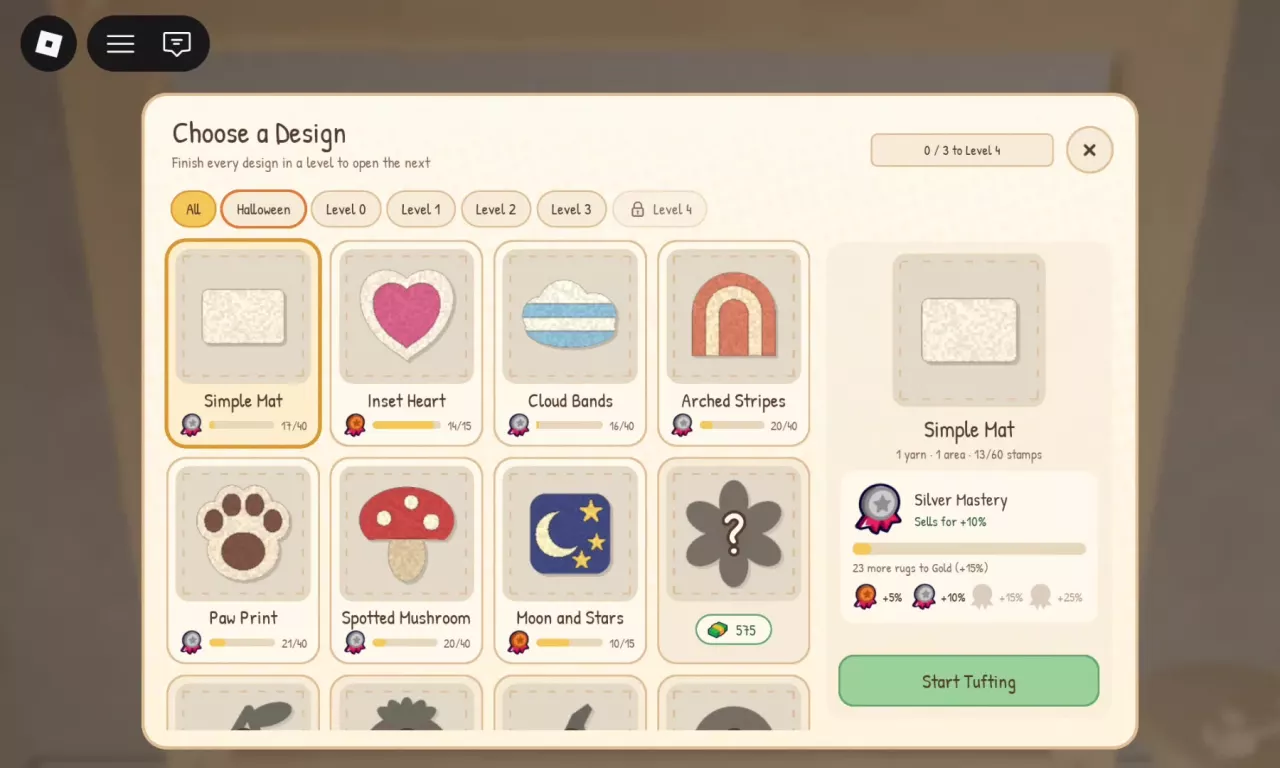
Rug designs include Simple Mat, Inset Heart, Cloud Bands, Arched Stripes, Paw Print, Spotted Mushroom, and Moon and Stars. Simple Mat is Level 0 and needs one yarn portion for one area. Inset Heart costs 40 cash to unlock and needs two portions, one for Border and one for Heart. Finish every design in your current level to open the next level. Find Halloween patterns through the Halloween filter in Choose a Design.

Choose a Design menu with level filters, a locked Level 4 counter and separate mastery progress.
Browse Rug Designs and Requirements

In Choose a Design, use All, Halloween, or the Level 0–4 filters to browse patterns. Select a design to view its requirements and mastery before choosing Start Tufting.

  • Simple Mat

    Shape
    Rounded rectangle
    Design level
    0 level
    Yarn required
    1 portion
    Pattern areas
    1 area
  • Inset Heart

    Shape
    Heart with an inner heart and surrounding border
    Unlock price
    40 cash
    Yarn required
    2 portions (One portion assigned to Border and one to Heart.)
    Pattern areas
    2 areas
    Area names
    Border; Heart
  • Cloud Bands

    Shape
    Cloud outline with horizontal bands
    Preview colors
    Blue and cream (Design-menu preview.)
  • Arched Stripes

    Shape
    Arch with curved stripes
    Preview colors
    Terracotta and cream (Design-menu preview.)
  • Paw Print

    Shape
    Paw outline with one main pad and four toe pads
    Pattern areas
    6 areas
    Area names
    Outline; Main pad; Toe 1; Toe 2; Toe 3; Toe 4
    Preview colors
    Cream background with brown paw pads (Design-menu preview.)
  • Spotted Mushroom

    Shape
    Mushroom with a cap, stem, and three spots
    Pattern areas
    5 areas
    Area names
    Cap; Stem; Left spot; Top spot; Right spot
    Preview colors
    Red cap with pale spots (Design-menu preview.)
  • Moon and Stars

    Shape
    Rounded square with a crescent and three stars
    Pattern areas
    5 areas
    Area names
    Sky; Crescent; Top star; Side star; Low star
    Preview colors
    Dark blue background with yellow celestial shapes (Design-menu preview.)

Choose a Pattern for the Rug You Want to Make

  • Simple Mat: Choose this for a straightforward rug using one yarn portion and one area. Its rounded rectangle keeps the color layout simple.
  • Inset Heart: Choose this when you want an inner heart and a surrounding color block. Assign yarn separately to Border and Heart.
  • Cloud Bands: Choose this for a cloud silhouette with horizontal stripes. Look for the blue-and-cream menu preview.
  • Arched Stripes: Choose this for curved bands within an arch shape. Its menu preview uses terracotta and cream.
  • Paw Print: Choose this for strong contrast between the outer shape and the main and toe pads.
  • Spotted Mushroom: Choose this when you want to arrange colors across a cap, stem and three spots.
  • Moon and Stars: Choose this for a background, crescent and three stars, with separate areas that help you organize the celestial details.

For specific yarn assignments and optional edging colors, use the rug color combinations.

Buy a Design and Unlock the Next Level

Buy Inset Heart

  1. Approach the Tufting Frame and use Make a Rug to open Choose a Design.
  2. Select Inset Heart, then hold its unlock control to spend 40 cash.
  3. Choose Start Tufting and assign two yarn portions: one to Border and one to Heart.

Buying the design unlocks the pattern; you still need its yarn before you can begin. If you have only one portion, collect another portion and fill both assignments.

Open the next design level

Finish every design in the current level to open the next level. If Level 4 is locked, work through the designs in your current level and follow the completion counter beside the level unlock.

That counter tracks level progression separately from the medal progress on each design. Repeatedly making one pattern increases that pattern's mastery; it does not replace finishing the other designs required for the next level. See mastery bonuses and remaining rugs for medal targets and progress calculations.

Choose a Design menu with level filters, a locked Level 4 counter and separate mastery progress.

Read Pattern Areas Without Overcounting Yarn

Pattern areas tell you where colors go and which parts still need tufting. Read the yarn requirement separately: the number of areas is not a yarn-portion total, and several areas can share a color.

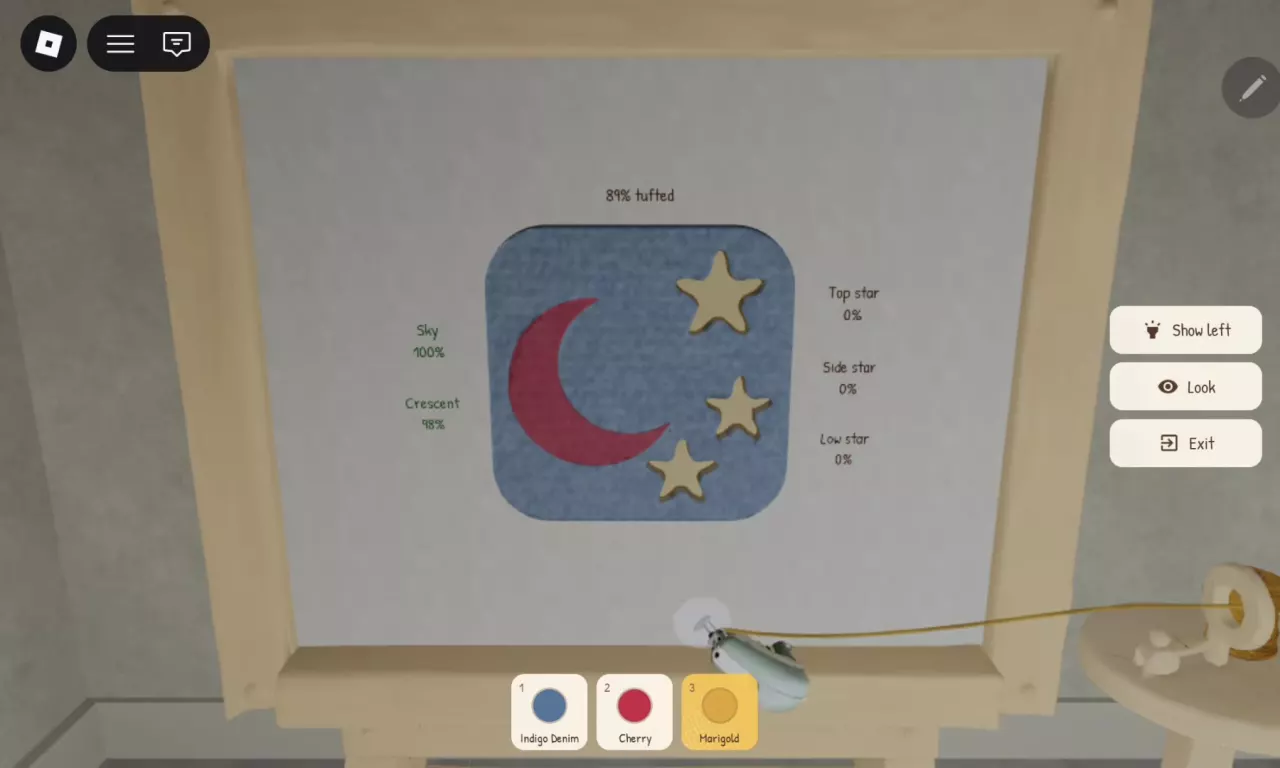
For example, Moon and Stars has five areas but supports a three-color setup: Indigo Denim for Sky, Cherry for Crescent, and Marigold for the stars. Here, Sky names the background area; it is separate from the yarn named Sky.

For Inset Heart, Border is a yarn-filled part of the heart pattern. Assign a portion to it during yarn selection. The later Add a Border? prompt applies optional edging around the finished rug and is a separate step.

Watch the individual progress indicators for small details. Paw Print tracks each toe pad separately; Spotted Mushroom tracks each spot; Moon and Stars tracks each star. Finishing a large background does not finish those smaller areas.

Overall tufting progress is not the simple average of the area percentages. A Moon and Stars rug can read 89% overall with Sky at 100%, Crescent at 98%, and all three stars at 0%. Use each area's indicator to find what remains. If a yarn prompt appears, switch to the yarn assigned to the area your tool is touching.

Follow the rug-making guide for the full tufting, shaving and edging steps, or choose a layout from the color combinations.
Moon and Stars rug with five area progress indicators and three selected yarn colors.

Find Halloween Designs and Recognize Locked Silhouettes

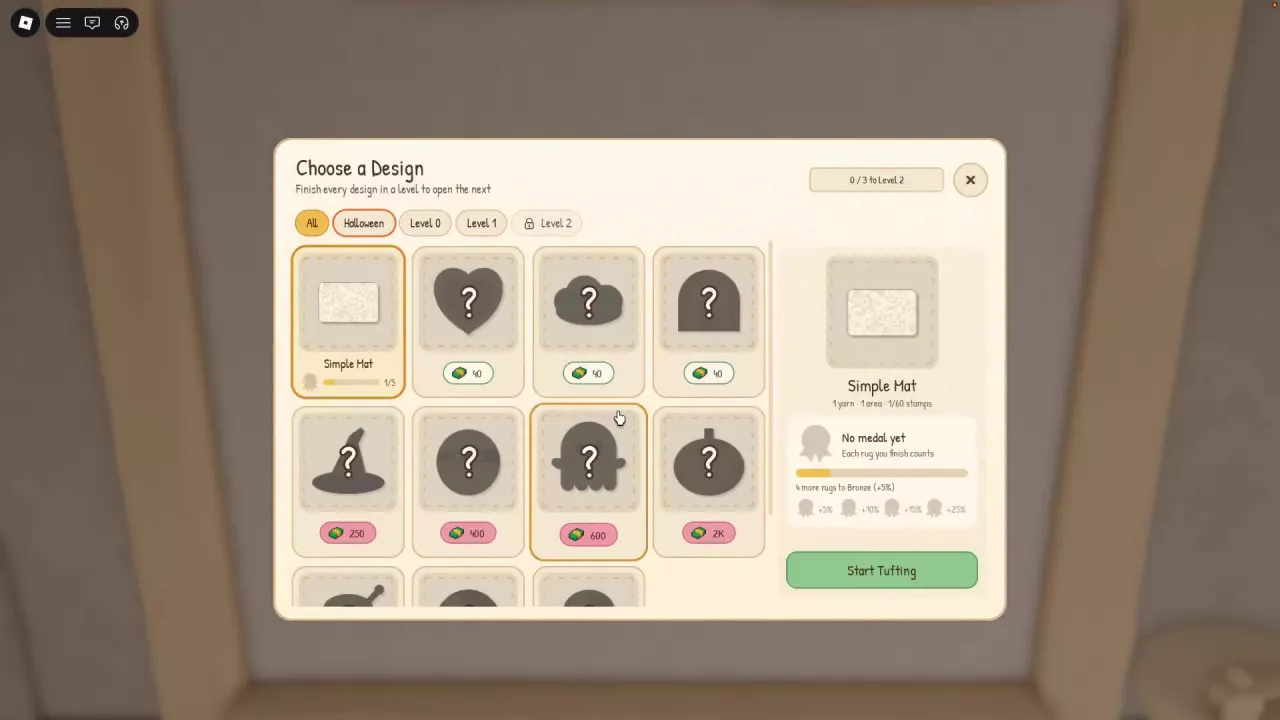
Open Choose a Design and select Halloween to browse that category. The wizard-hat-shaped Halloween design costs 250 cash to unlock.

Other locked silhouettes in the design menu have these prices:

Locked silhouette Unlock price
Cloud shape 40 cash
Arch shape 40 cash
Circle 400 cash
Ghost shape 600 cash
Pumpkin shape 2,000 cash
Design menu with the Halloween filter and cash prices beneath locked silhouettes.