
Upgrade Controls and Studio Purchases
Make Rugs Studio Guide: Workstations, Upgrades and Menus
Last updated:
Find the right workstation for your next task, locate equipment upgrades, and identify studio purchase markers in Make Rugs.
Quick answer
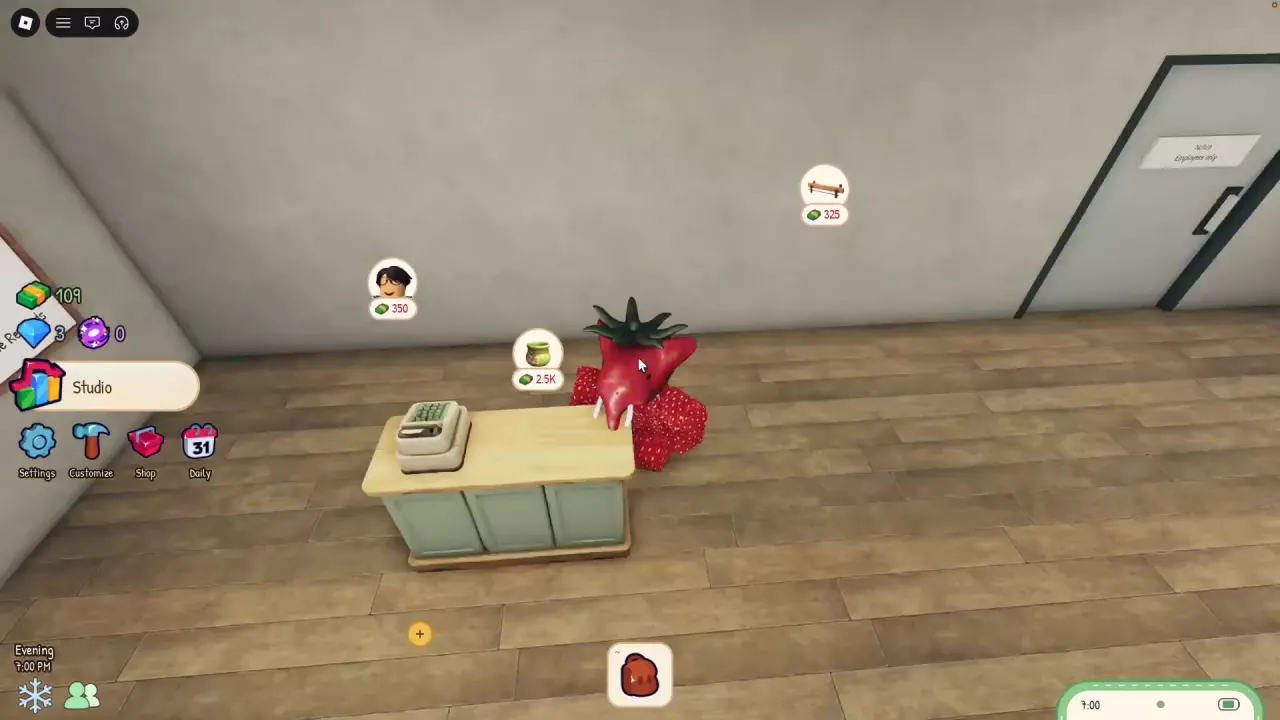
Use each workstation’s named interaction for its task. Find Upgrade beside the Yarn Dispenser and above the Tufting Frame. Studio purchase markers list the green Tip Jar at 2,500 cash, the black-haired character portrait with glasses at 350 cash, and the long wooden fixture at 325 cash. Open daily rewards through the Daily calendar icon. Once you have employees, they continue working while you are offline.
View in-game reference
Find the Workstation for Your Next Task
Approach the workstation and use the interaction that matches what you want to do.
| Your task | Workstation | Interaction | What to have ready |
|---|---|---|---|
| Roll yarn | Yarn Dispenser | Hold E — Roll Yarn | Collect the yarn afterward at the Collection Tray. |
| Pick up yarn | Collection Tray | E — Collect Yarn | Yarn ready to collect. |
| Choose a design and start tufting | Tufting Frame | E — Make a Rug | Collected yarn to assign to the design’s areas. |
| Shave a tufted rug | Shaving Table | E — Shave a Rug | An Unshaven rug. |
| Put a finished rug on sale | Display Rack in the showroom, including racks by the windows | Click the yellow + on an empty rack | Hold a finished rug near the empty rack. |
| Pack an order rug | Packing Bench | Pack an Order | An order rug ready to pack. |
| Ship a packed order | Parcel Cabinet on the sidewalk near the shop window | Send a Package | A packed order. |
For material pickup, follow the yarn rolling and collection guide. For the full production sequence, follow how to make a rug. Once your rug is finished, use the display and selling guide or the order packing and shipping guide for its next destination.
Locate the Yarn and Tufting Upgrade Controls
- Yarn Dispenser: Find Upgrade beside the machine, near the Roll Yarn interaction. Use Roll Yarn to roll materials and Collect Yarn at the Collection Tray to pick them up.
- Tufting Frame: Find Upgrade above the frame. Use the separate Make a Rug interaction to choose a design and begin making a rug.
The yarn equipment has a two-slot upgrade option. Look for equipment improvements through Upgrade; the Collection Tray’s Collect Yarn prompt is the pickup action.
Recognize Studio Purchase Markers and Prices
Look for floating purchase icons inside your shop, with a cash price beneath each icon. Identify the offers by their appearance: a small green Tip Jar, a black-haired character wearing glasses, or a long wooden structure with legs. The Tip Jar’s 2.5K price means 2,500 cash.
For additional rug display space, look among the studio’s expansion purchase markers. See how to display and sell rugs for using an available rack.
-
Tip Jar
- Appearance
- Small green jar
- Listed price
- 2500 cash (Studio purchase marker)
-
Character Portrait Purchase
- Appearance
- Black-haired character wearing glasses
- Listed Price
- 350 Cash (For the shop purchase marker with the black-haired character wearing glasses.)
-
Long Wooden Fixture
- Appearance
- Long wooden structure with legs
- Listed price
- 325 cash (Studio purchase marker with a long wooden fixture icon)
Employees Continue Working Offline
You can hire employees to help run your studio. Once you have employees, they continue working while you are offline.
Open Daily from the Calendar Icon
Select the calendar icon labeled Daily on the main screen to open the daily rewards menu.